Teams of five, on official WARDOGS servers, against one clock. The team that grows its balance the most takes the cup. The Kennel.gg Tournament plugin reads every player's cash HUD live, so the scoreboard is the game itself.
Sign-ups run through the Kennel Discord. The first cup date will be announced there.During a cup, this board updates every few seconds from every player's plugin. Until the first cup, it plays a simulated one: 10 teams, 60 minutes, real WARDOGS payouts. Click any team to follow it.
The demo uses community-observed WARDOGS payouts: Hot Zone revives, taxi runs, supply drops, long-range kills. Each team plays one money route, and every death costs a loadout. The teams and players are invented. During a real cup, this board shows real teams and nothing else.
No brackets and no kill counts. Every team plays the same window on official servers, and the scoreboard asks one question: how much richer did you get?
Captains register a team of five with a name and a tag. Staff confirm every roster before the cup.
Every player is streaming with the Kennel.gg Tournament plugin running and the game set to English. Staff see each player's reading come in before the start.
When the countdown ends, the plugin snapshots every player's balance. That snapshot is your $0. What you had before the cup doesn't count for or against you.
Normal WARDOGS on official servers. Hold zones, revive, fly taxis, run supplies, snipe. Anything that earns counts, and anything you spend comes off your score.
The clock stops and the board freezes. The highest balance change takes the cup, and results go up on Discord.
The scorekeeper runs on every player's PC. It watches the cash HUD on your game capture, taking about 8 ms per reading, and reports each settled change to the Kennel.gg scoreboard. That feed runs this page, the stream overlays, the caster desk and the Discord bot.
The number that decides the cup. The first reading after the countdown becomes your $0.
The green or red box next to your balance: what this match has made or cost you so far.
Lines like CONTROL ZONE PRESENCE and REVIVED TEAMMATE. They tell the board where the money came from.
KILL CONFIRMED and its amount, including the skulls on a multi-kill.
A teammate gets picked up inside the Control Zone. A new feed line appears, the balance box rolls up by $500, and the plugin records the change along with the line that explains it.
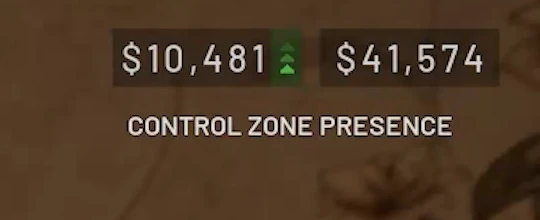
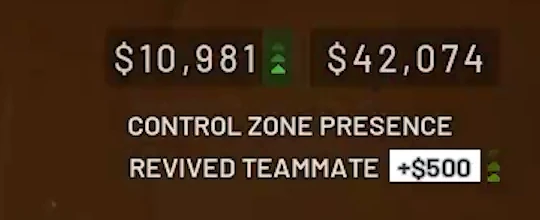
WARDOGS counts amounts up before it shows the final figure. Mid-roll, this pop-up reads +$1,477, a number that was never paid. The plugin ignores values that are still moving and records the one the HUD settles on.
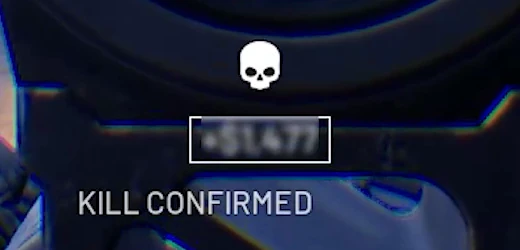
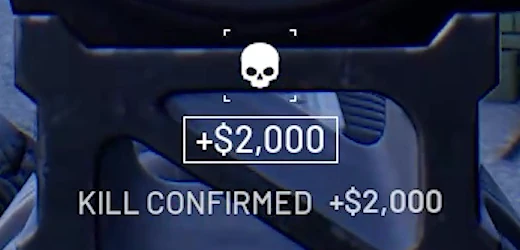
Frames from the WARDOGS reveal trailer (Bulkhead / Team17 press kit), shown at full 4K resolution.
Tested at 720p, 900p, 1080p, 1440p and 4K. The HUD scales with your screen height and stays in the top-right corner, and the plugin follows it.
It looks at the game source before your scene is put together, so a webcam or overlay over the HUD doesn't get in its way.
Amounts that are still rolling never reach the board. A score only changes when the game's own number has stopped moving. On test footage it wasn't tuned on, the reader never accepted a wrong value.
Balances carry over between matches in WARDOGS, so the cup measures change from the horn. A rich account starts level with a new one.
The plugin reads HUD text in English. A player whose game is set to another language is flagged and scores $0 until it's switched.
"Add to scene" puts your player card and the cup standings into OBS as browser sources, already sized.
Registered players get the plugin through the Kennel Discord before the first cup.
Both overlays read the same live feed as this board and sit on a transparent background. Below they're running on the demo cup, following the team you picked above.
Your name, your cup earnings, your last payday, your team's rank and the top five teams. kennel.gg/cashcup/overlay/player.html
The whole cup, ranked, with the direction each team moved in the last minute. kennel.gg/cashcup/overlay/leaderboard.html
Sign-ups run in the Kennel Discord, through the Kennel.gg Tournament bot. Use the buttons on the Cash Cup sign-up panel, or the slash commands. The rules, check-in, cup dates and results are all in the same place.
In the Cash Cup channel, press Set profile on the sign-up panel, or run /profile set. Add your in-game name and your Twitch.
The captain presses Create team (or /team create) with a name and a 2–5 letter tag, then shares the join code from /team code. Teammates press Join with code (or /team join).
Install the Kennel.gg Tournament plugin in OBS. It shows a code like KNL-XXXX. Press Link plugin on the panel (or run /link) and enter it.
When staff open check-in, run /checkin. It shows what's ready and what isn't: plugin linked, HUD seen, English, streaming.
Yes. The plugin reads each player's HUD from their own game capture, and the stream is how staff and viewers can check a score. If a player stops streaming, their money still counts, but they're flagged on the board and the plugin shows them a red warning in OBS.
No. The plugin reads the game source before OBS adds your camera and overlays, so what covers the HUD on your stream doesn't cover it for the plugin.
Yes. Your score is your balance now minus your balance at the horn. A $6,250 helicopter puts you $6,250 down until it earns that back. The board shows gross earnings too.
The plugin reads the HUD's text, and English is the only language it reads so far. A player on another language is flagged and scores $0 until they switch.
Whatever you play at. The plugin has been tested at 720p, 900p, 1080p, 1440p and 4K. The HUD keeps its place in the top-right corner and scales with screen height, so the reader scales with it.
Both are set for each cup and announced on Discord with the date. The demo above runs 60 minutes with 10 teams, and you can switch it to 5.
No. No feeding and no griefing. Play WARDOGS straight on official servers. The full rules are pinned in the Cash Cup channel on Discord.
Registered players get the Kennel.gg Tournament plugin through the Kennel Discord, with setup help in the same channel. Once it's installed, it shows a code you enter with /link.
Grab four friends and a tag, then come and sign up. The board is waiting for real names.